

In today’s fast-paced digital world, the debate on desktop PC vs laptop has become more relevant than ever. Whether you’re a student, working professional, gamer, designer, or someone looking for a reliable daily-use computer, choosing the right device can significantly impact your productivity and overall experience.
With rapidly evolving technologies, both desktops and laptops now offer cutting-edge features, but which one should you pick? This comprehensive guide goes deep into performance, portability, upgradeability, gaming, pricing, and more, helping you make a confident and informed decision.
Let us begin this blog with an interesting section.
Desktop PC vs Laptop: Understanding the Core Differences
Before analyzing specifics, it’s important to understand what separates a desktop from a laptop. This foundational knowledge helps you choose which device aligns better with your lifestyle and computing needs.
What Is a Desktop PC?
A desktop PC is a stationary computing system that usually includes a CPU tower, monitor, keyboard, mouse, and optional external accessories like speakers or webcams.
Desktops are designed with performance, durability, and customization in mind. Due to their larger internal components, desktops typically deliver more power compared to similarly priced laptops.
What Is a Laptop?
A laptop is an all-in-one portable computer that combines a display, keyboard, trackpad, battery, and internal hardware in a compact unit. Built for mobility and convenience, laptops allow you to work from anywhere effortlessly.
Modern laptops have become extremely powerful, offering competitive performance for professional tasks, entertainment, and gaming.
Desktop PC vs Laptop: Find Out Which Device Delivers More Value
There are many ways a desktop PC and a laptop can differ. And whether you’re a student, a working professional, a gamer, or buying your first computer, this simple comparison will make it easier for you to choose the one that truly fits your needs.
Let us see one by one, briefly, for your better understanding.
1. Performance
Desktop PCs are recognized as the ultimate performance machines! When it comes to raw computing power, desktops dominate the competition. Their components, such as full-sized CPUs, dedicated GPUs, larger cooling systems, and greater power capacity, allow them to handle intensive workloads with ease.
Desktops excel in:
- 4K video editing and rendering
- Artificial intelligence and machine-learning workloads
- Heavy 3D modeling and simulation
- Large-scale multitasking
- AAA gaming on ultra settings
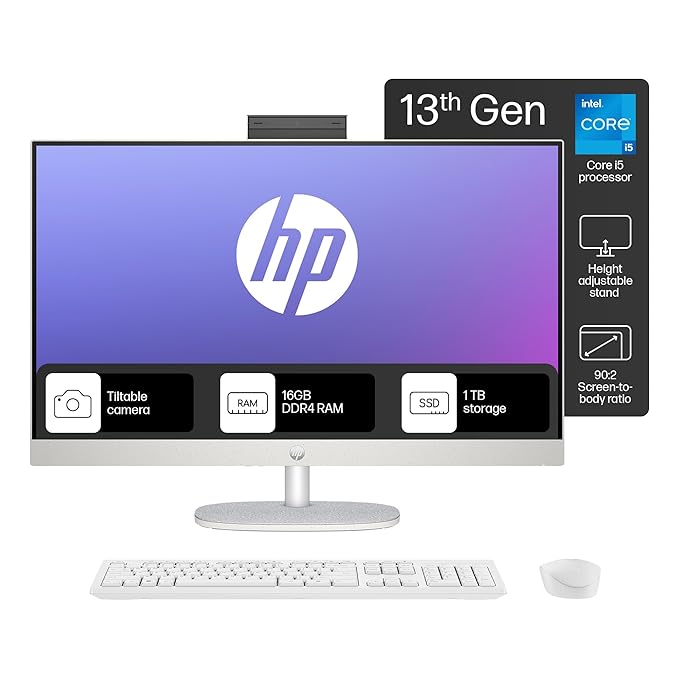
Better airflow also ensures that desktops maintain peak performance longer without thermal throttling. These advantages make desktops the best choice for gamers or content creators who require top-level performance. In the current market, there are many desktops. Among them, the HP all-in-one PC stands as one of the best desktops with high-end features. Also, recognized as the best choice on Amazon.
This 27-inch FHD touch All-in-One PC features an Intel Core i5-1335U processor, 16 GB RAM, and a 1 TB SSD for smooth performance. Enjoy vibrant visuals with a 300-nit IPS display and Intel UMA Graphics. It comes with Windows 11 Home (S mode), Microsoft Office 2021, and multiple USB and RJ-45 ports for easy connectivity.

Whereas laptops are powerful, but with built-in limitations. Modern laptops are undeniably powerful. We can say thanks to advancements like:
- Intel Core Ultra or AMD Ryzen 7000/8000 series processors
- NVIDIA RTX 40-series laptop GPUs
- High-refresh-rate displays
- Improved thermal designs
While laptops compete closely with mid-range desktops, their compact designs force a balance between performance and heat management. For intensive or prolonged workloads, laptops may reduce performance to avoid overheating.
2. Portability
Laptops are the clear winner for mobility. If portability is essential, laptops win without debate. Students, travelers, remote workers, and digital nomads prefer laptops because they can work from Cafés, offices, hostels, and flights, living rooms, or co-working spaces.
On the flip side, desktop PCs are powerful but not portable. Desktops are not designed for mobility; they require a fixed workspace. Even compact mini-PCs can’t match laptop portability. If your daily routine involves frequently changing work environments, a desktop may feel restrictive.
3. Upgradability and Future-proofing
Desktops offer unmatched upgradability. You can easily upgrade or replace the graphics card, processor, RAM, storage, motherboard, power supply, and cooling systems
This flexibility extends the system’s lifespan, offering long-term value and adaptability, making desktops one of the best tech product investments for lovers who enjoy customizing their setup.
On the other hand, most laptops only allow upgrades to RAM and storage, and even these are soldered in many modern models. CPU and GPU upgrades are generally impossible. Once performance becomes outdated, replacing the entire laptop becomes necessary.
4. Price and Value
Desktops provide more power at a lower cost because they use full-sized components and don’t require compact engineering. For the same price, you’ll almost always get:
- Better graphics performance
- Better cooling
- Higher overall speed
- Better future upgrade paths
Laptops are quite expensive compared to desktops, but the good part here is that you pay for convenience. They cost more because they include:
- Built-in display
- Battery
- Keyboard and trackpad
- Compact engineering
- Lightweight design
For users who value mobility, the additional cost is justified.
5. Display and Input Experience
Desktops allow for an ergonomic, customizable workspace. Therefore, you can use dual/triple monitor setups, 27-inch or 32-inch 4K displays, mechanical keyboards, high-precision mice, and adjustable monitor stands. Such a setup is ideal for productivity, gaming, and creativity.
Laptops are convenient, but limited screen space. Laptop displays typically range from 13 to 17 inches. While you can connect external monitors, the on-the-go workspace remains limited.
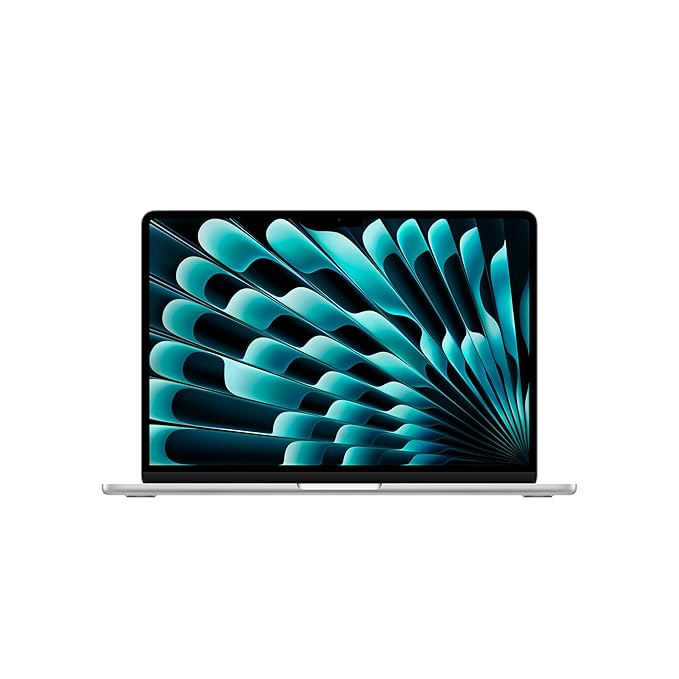
In today’s competitive laptop market, the Apple 2025 MacBook Air stands out as one of the best lightweight notebooks with top-tier performance. Powered by the cutting-edge M4 chip with a 10-core CPU, it delivers exceptional speed and efficiency, making it a preferred choice for users. It’s also widely recognized as one of the best-rated options on Amazon.
The MacBook Air M4 delivers fast performance, smart Apple Intelligence features, and up to 18 hours of battery life. Enjoy a vibrant 13.6-inch Liquid Retina display, a sharp 12MP camera, great audio, and versatile connectivity with Thunderbolt 4, MagSafe, and Wi-Fi 6E.
6. Gaming Performance
Desktop PCs are the gaming champion. Desktops dominate gaming because they support high-end GPUs, better cooling, and smooth frame rates. You can play the latest AAA titles in 4K resolution, ultra graphics settings, and VR environments. For serious gamers, a desktop PC is the best choice that never disappoints.
Gaming laptops are portable yet powerful. They allow you to play anywhere. However, they heat up faster, fans get loud, and the battery drains quickly. For gamers who travel often, gaming laptops are the best choice due to their mobility.
7. Battery Life and Power Consumption
Laptops are designed for energy efficiency. Battery life varies by model:
- Ultrabooks: 10–15 hours
- Mid-range laptops: 6–8 hours
- Gaming laptops: 2–4 hours
Their energy-efficient design makes laptops ideal for students and travelers.
Whereas desktops PC have higher power consumption. Desktops require constant power and generally consume more electricity. This isn’t an issue for fixed workspaces, but matters for energy-conscious users.
8. Noise, Heat, and Maintenance
Desktop PCs have better cooling systems and can be maintained easily. Desktops stay cooler due to larger internal space, bigger fans, and better airflow. This means less noise, longer-lasting components, easy cleaning, and part replacement.
Laptops are compact but hotter. Laptops struggle more with heat due to tighter internals. Dust buildup or aging thermal paste can reduce performance and often requires professional servicing.
Desktop PC vs Laptop: Best Use Cases
Both have lots of use cases in real-time. So, let’s take a look at how desktops and laptops are used in real life.
Use Cases for Desktop PCs
- Ideal for users who need maximum performance and extreme multitasking capability.
- Best for gamers who want to play AAA titles on ultra settings.
- Perfect for video editors, 3D artists, and creators using heavy rendering software.
- Suitable for programmers who rely on multi-monitor setups.
- Great for data analysts handling large datasets, simulations, or computation-heavy tasks.
- Supports higher processing power and better thermal management for long workloads.
- Fits users who work from a fixed location without needing mobility.
- Ideal for those who enjoy customizing and upgrading components over time.
- Offers the best performance per rupee/dollar for long-term value.
- Most reliable option for users who want a long lifespan and maximum power.
Use Cases for Laptops
- Best for users who prioritise mobility, portability, and working from any location.
- Suitable for students attending classes and working across campus.
- Perfect for remote employees switching between home, office, cafés, and co-working spaces.
- Ideal for frequent travelers who need a lightweight, compact device.
- Great for business professionals who present, meet, and work on the go.
- Useful for casual users who browse, stream, and do basic tasks.
- Supports creative users using touchscreen or 2-in-1 laptops for sketching and editing.
- Provides an all-in-one device with a built-in display, keyboard, webcam, and battery.
- Requires minimal setup and works instantly anywhere.
- Best choice for lifestyles that demand flexibility and movement.
Desktop PC vs Laptop: Pros and Cons
Here’s a simple comparison table to help you easily understand the advantages and disadvantages of using a desktop PC in today’s world.
Desktop PC Cons
- Delivers high performance with full-sized CPUs and powerful GPUs.
- Superior cooling allows heavy workloads without overheating or throttling.
- Offers long-term value with easy upgradeability of CPU, GPU, RAM, and storage.
- Supports large multi-monitor setups for maximum productivity.
- Ideal for gaming, editing, streaming, and professional creative workflows.
Desktop PC Cons
- Not portable and requires a fixed workspace.
- Impractical for users who travel or work across multiple locations.
- Occupies more physical space due to the tower, monitor, and accessories.
- Requires setup time involving cables and external devices.
- Consumes more electricity compared to laptops.
Here’s a simple comparison table to help you easily understand the pros and cons of using a laptop in today’s world.
Laptop Pros
- Highly portable and can be carried anywhere.
- Built-in battery, display, keyboard, speakers, and webcam offer all-in-one convenience.
- Ideal for students, professionals, and frequent travelers.
- Works instantly with minimal setup and saves desk space.
- Modern laptops support gaming, editing, programming, and business tasks.
- Offers fast boot times and quick access to work.
Laptop Cons
- Limited upgradeability, often restricted to RAM or SSD only.
- More expensive for similar performance compared to desktops.
- Generates more heat and may throttle during heavy usage.
- Repairs are costly due to tightly packed internal components.
- Battery wear reduces performance and usability over time.
- Smaller screens and compact keyboard layouts reduce productivity.
We hope this comparison has given you the clarity you need to choose the device, desktop PC, or laptop that best suits your workflow.
Final Verdict: Desktop PC vs Laptop — Which Is Right for You?
There’s no universal winner; the right choice depends entirely on your needs. Choose a desktop if you want power, long-term value, upgradeability, and a superior workspace. Choose a laptop if you prioritise portability, energy efficiency, and flexibility.
As you consider your lifestyle, usage habits, budget, and future requirements, you’ll be able to confidently select the device that enhances your daily life. Whether you’re buying for yourself or looking to buy the best device for gifting, both desktops and laptops offer incredible benefits when chosen wisely.

